
Precision Tools
heimatec.Capto™ increases efficiency in set-up and tool changing times for lathes and machining cen
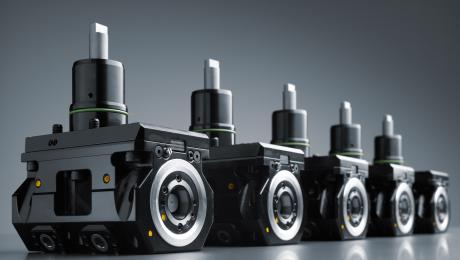
With heimatec.Capto ™, heimatec is expanding its product range with a further modular tool quick-change system, which significantly increases the efficiency in set-up and tool changing times. heimatec.Capto ™ is extremely flexible and offers a wide modularity as well as a great variety of change-over inserts for lathes and machining centers.
Coromant Capto® is an international widely used modular tool quick-change system that can be utilized in all machine types. The special advantage is the substantial reduction in set-up and tool changing time and greatest tool flexibility.
With heimatec.Capto™, heimatec is expanding its product range with a modular tool quick-change systems. In addition to a wide range of standard tools with capto adaptions, the heimatec.Capto™ program also offers a large number of specific tools designed for machine optimization.
The modular quick-change system heimatec.Capto™ is characterized by a compact design of short overall length, which allows to perform high cutting speeds, while at the same time achieving best surface qualities. The heimatec.Capto™ tool quick-change system is available for Capto sizes C3, C4, C5, C6 and C8.
heimatec.Capto™ is one of three (quick) change systems offered by heimatec. At EMO 2023, trade fair visitors can view and test the differences and individual advantages of the individual systems in Hall 5 Stand D33.
heimatec has been specializing in the design, manufacture and distribution of high-precision static tool holders and driven tool units for lathes and machining centers for more than 35 years. The entire tool palette includes several thousand products. heimatec is one of the leading international precision tooling companies in terms of technology and quality. Headquartered in Renchen, Germany, heimatec has a subsidiary in India and numerous representatives and trading partners all over the world.
With heimatec.Capto ™, heimatec is expanding its product range with a further modular tool quick-change system, which significantly increases the efficiency in set-up and tool changing times. heimatec.Capto ™ is extremely flexible and offers a wide modularity as well as a great variety of change-over inserts for lathes and machining centers.
Coromant Capto® is an international widely used modular tool quick-change system that can be utilized in all machine types. The special advantage is the substantial reduction in set-up and tool changing time and greatest tool flexibility.
With heimatec.Capto™, heimatec is expanding its product range with a modular tool quick-change systems. In addition to a wide range of standard tools with capto adaptions, the heimatec.Capto™ program also offers a large number of specific tools designed for machine optimization.
The modular quick-change system heimatec.Capto™ is characterized by a compact design of short overall length, which allows to perform high cutting speeds, while at the same time achieving best surface qualities. The heimatec.Capto™ tool quick-change system is available for Capto sizes C3, C4, C5, C6 and C8.
heimatec.Capto™ is one of three (quick) change systems offered by heimatec. At EMO 2023, trade fair visitors can view and test the differences and individual advantages of the individual systems in Hall 5 Stand D33.
heimatec has been specializing in the design, manufacture and distribution of high-precision static tool holders and driven tool units for lathes and machining centers for more than 35 years. The entire tool palette includes several thousand products. heimatec is one of the leading international precision tooling companies in terms of technology and quality. Headquartered in Renchen, Germany, heimatec has a subsidiary in India and numerous representatives and trading partners all over the world.